
Delta Panel — FiveM Admin Panel for QBCore, QBox, ESX, vRP & CFW Servers
Run your server from the browser or from inside the game.
- Browser and in-game
- Manage Characters
- Manage Vehicles
- Live Screens
$7.99 /mo · $19.99 /quarter
Works with · QBCore · QBox · ESX · vRP · CFW
At a glance
- Works with
- QBCore, QBox, ESX and vRP servers, CFW included
- Inventories
- Most inventory resources, on every framework
- Where it runs
- In the browser, and in the game with /delta
- Players
- Online and offline
- Sign-in
- Discord OAuth2
- Languages
- Arabic and English, in the browser and in game
About this resource
Delta Panel gives your staff one place to run the server: who is online, every character and vehicle, inventories and stashes, bans, the priority queue, and a full log of who did what. They can watch a player's screen as it happens and act on what they see. It works in the browser and inside the game: your admins type /delta and get the same pages with the same permissions, without leaving the server. It runs on QBCore, QBox, ESX and vRP, with an activity chart for players and admins, restoring a deleted character within 90 days, several roles for one admin, and in-game notifications in Arabic or English.
- Updates are included for the life of the licence.
- Support is on Discord, from the people who wrote it.
Features
Players and characters
- Search every character on the server — by name, citizen ID or licence — not only the first page.
- A full profile for each character: money, job and grade, gang and rank, identity, vehicles and inventory.
- Set, give or take cash and bank money.
- Change job, gang and grade from lists read from your own server.
- Edit identity: first and last name, birth date, gender, nationality and phone.
- Edit character metadata key by key, with the right control for each value.
- Change License — move a character to the Rockstar licence it should load with.
- Change a character's citizen ID across every table that references it.
- Shows the character ID and identity number your framework uses.
- Delete a character, with a typed confirmation.
- Restore a deleted character within 90 days: a full copy is kept when it is deleted, and the audit log brings it back.
- Set a connected player's permission level: user, mod, admin or god.
Quick actions on connected players
- Revive, feed and give armour.
- Teleport to a saved location or to exact coordinates.
- Open the clothing menu on the player's screen.
- Cuff and uncuff, and release from jail.
- Kick with a reason the player sees.
- Direct message a player, or send an announcement to the whole server.
- Choose the language of Delta's in-game notifications and alerts: Arabic or English.
- Every action reports back only once the change has really happened on the server.
Inventories and stashes
- Read any player's inventory with item images and labels.
- Give, remove or clear items for a connected player.
- Move items between slots while the player is offline.
- Browse every stash on the server, search its items, add, remove or clear.
- Open a vehicle's trunk and glovebox from its page.
Vehicles
- Search every vehicle on the server by plate, model, owner or state.
- Give a vehicle, transfer ownership or change the plate.
- Change a vehicle's stored state, or delete it.
- Repair the vehicle a connected player is sitting in.
Live Screens
- Watch a connected player's game view live in your browser.
- Several players side by side, and one expanded to full size.
- It streams only while somebody is watching and stops on its own when you leave.
- No audio, no recording, nothing stored.
Moderation and protection
- Bans with a duration and a reason, editing, unbanning and search across every ban.
- Connection protection: require Discord, Steam or Xbox, block a duplicate licence, block VPNs.
- Name rules: block colour codes, symbols and unsafe markup in player names.
- A refused player sees a clear card with the reason and a link to your Discord.
- Dupe Scanner: finds duplicated weapons across inventories and stashes and removes them.
- Investigator: one search across characters, vehicles, stashes and logs.
Server overview
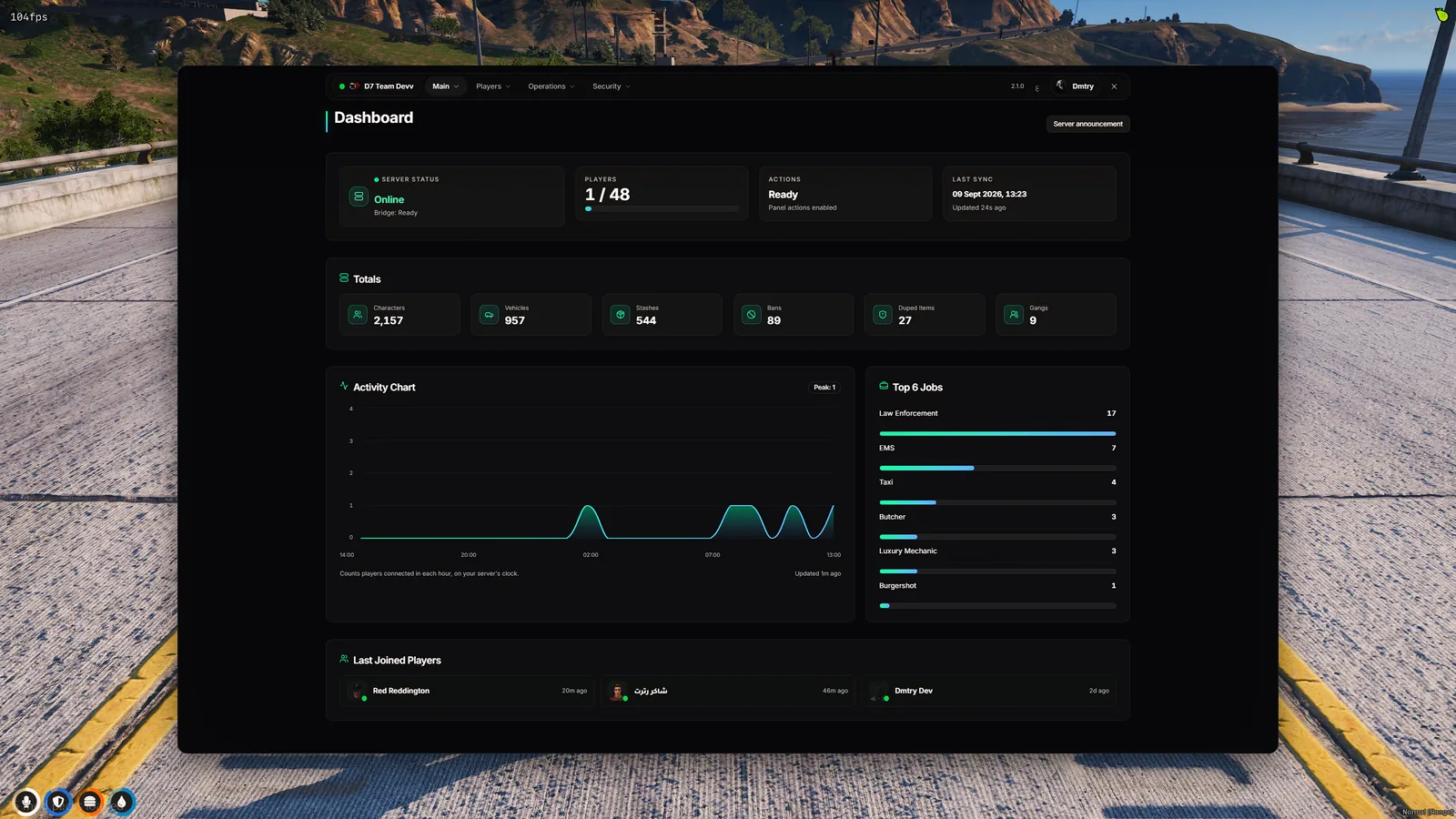
- Dashboard: who is online now, the last players to join, and an activity chart of players and admins by day, week or month.
- Online players with their characters, one click from each profile.
- Give players priority under names you choose (like VIP Gold), with full control of the queue.
- Gangs and their members.
- Leaderboards your players can open in their browser, with weekly and all-time boards.
Staff, permissions and logs
- Admins and roles with per-permission control over every page and action.
- Give one admin several roles, each with its own permissions — they get everything those roles allow together.
- Audit log of every admin action — who, what, to whom and when — with Discord webhooks.
- Several servers under one account, each with its own admins and settings.
- FiveM Config page: the resource's settings, edited from the website, with options that follow your framework.
- In-game menu on /delta with the same pages and the same permissions.
Online and offline players
Most of the panel works whether the player is connected or not. Only what happens inside the game needs them online.
Online or offline
- Money, job, gang and grade
- Identity and metadata
- Change License and Change Citizen ID
- Delete a character
- Vehicles: give, transfer, plate, stored state, delete
- Stashes, bans and queue priority
Player must be online
- Revive, feed, armour and teleport
- Kick, direct message and announcement
- Permission level, clothing menu, cuff and unjail
- Give, remove or clear inventory items
- Repair the vehicle the player is in
- Live Screens
Player must be offline
- Move items between inventory slots
Pricing
Premium Plan
Delta Panel and every script — Advanced MDT and Advanced BossMenu — in one subscription.
Getting started
- 1Buy it on our store.
- 2Sign in to panel.d7team.com with Discord and redeem the code you received — the licence activates on the spot.
- 3Download the resource from the Client Area and add it to your server's resources folder.
- 4Start it with ensure DeltaPanel. One resource, five files, no database migrations to run.
- 5Open panel.d7team.com, pick your server, and add your staff with the roles you want.